
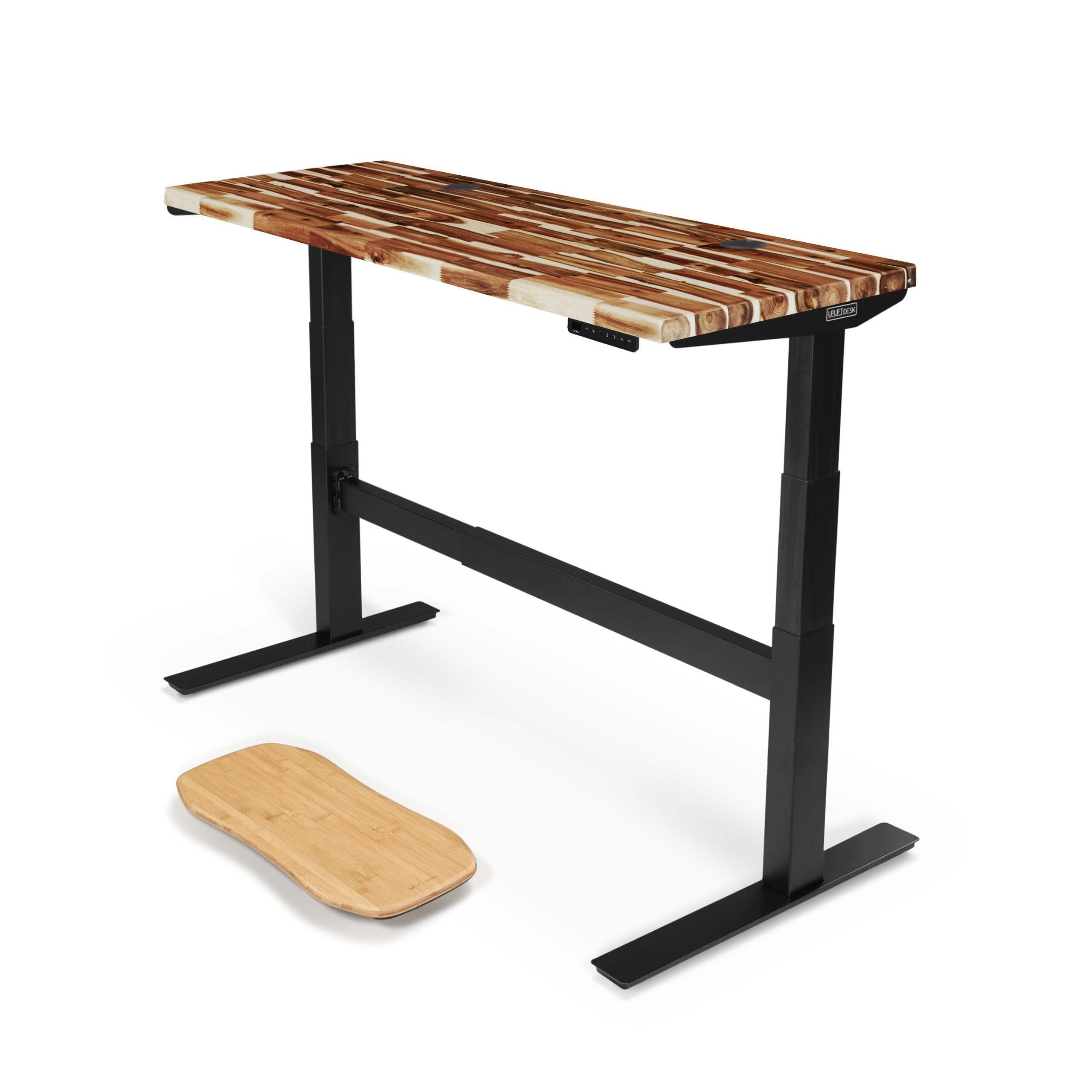
Why We Recommend the UPLIFT Desk V2 Commercial Standing Desk
Choosing a standing desk requires balancing three competing pressures: affordability, reliability, and feature completeness. The UPLIFT V2 Commercial lands in the mid-premium tier at $659, which is meaningful because it avoids both the cut-corner budget desks (often under $300) that skimp on motor power or warranty and the high-end models ($900+) that add modular tops or integrated cable management without meaningfully improving the core mechanism.
The 22.6-to-48.7-inch height range (frame plus a 1-inch top) is the spec that matters most: it accommodates users from roughly 5'2" to 6'5" in both sitting and standing positions, which covers the large majority of office workers. Budget desks often compress this range—the FlexiSpot EN1 below tops out at 47.6 inches—forcing taller users to compromise. The 355-pound lifting capacity, confirmed on UPLIFT's published V2-Commercial spec sheet, comfortably carries a desktop (a heavy solid-wood top alone can run 80–100 lb) plus dual monitors, a keyboard, and typical accessories; it's not a heavy-industrial spec, but it reflects honest engineering for office use rather than aspirational numbers that inflate the price.
Anti-collision technology is a feature we weight heavily in this category. When the desk encounters resistance during upward movement—your leg, a chair, a cable—the motor stops and retracts slightly rather than continuing to apply force. This is a genuine safety and longevity feature that prevents pinch injuries and motor burnout; it is worth confirming on any desk you consider, including budget models, since implementations vary in sensitivity. The 4 memory presets let you save sitting and standing heights, which matters because you'll return to the same positions many times per day, and manually adjusting every transition exhausts the appeal of standing desks within weeks.
UPLIFT backs nearly every product it sells with a 15-year warranty, per its published warranty terms—far longer than the coverage on competing frames, such as the up-to-7-year warranty on the Herman Miller Jarvis or the 10-year frame coverage from Autonomous. A longer warranty reduces your lifetime cost of ownership because it shifts repair risk to the maker for a decade and a half. The published-review record points the same direction: GamingTrend's review of the V2 Commercial praised its stability and quiet dual-motor drive, with the main complaints being a roughly six-hour solo assembly and a frame heavy enough that relocating it is a two-person job.
Where you trade off: this desk does not offer app-based presets or integrated power delivery. If you need those, you're looking at desks in the $900–1,200 range. For most people, those additions don't justify the price premium.
Where the V2 Delivers, Where It Doesn't
Where It Shines
- The listed 25.3–50.9 inch height range accommodates a broad user population, reaching both full standing extension and comfortable seated positions, whereas desks with narrower ranges force taller or shorter users to work at suboptimal ergonomics.
- Anti-collision technology is a genuine safety and hardware-protection feature. It stops upward movement on contact, preventing pinch injuries and motor strain—especially important if you share the desk or work near children.
- Four memory presets eliminate the friction of manual height adjustment. Once programmed with your sitting and standing heights, you switch positions with a single button press, which is the difference between using a standing desk consistently or abandoning the habit after a month.
- The 15-year warranty is among the longest standard coverage in the category and signals manufacturing confidence. It covers defects across nearly the whole product, reducing your exposure to costly repairs in the years after shorter rival warranties lapse.
- The 355-pound lifting capacity is honest and appropriate for office use. It supports a fully loaded desk setup—even a heavy solid-wood top plus dual monitors, keyboard, mouse, and lamp—with generous margin, and the dual-motor drive holds its 2-inch-per-second travel speed under load.
Where It Falls Short
- Four memory presets is the category standard, but it's tight if you share the desk across multiple users with different ergonomic needs. If you have a spouse or colleague with a significantly different height or preferred sitting position, each person gets only two saved positions, and managing shared presets becomes tedious.
- No app-based height control or integration with smart office systems. If you use workplace automation or want to log desk usage for ergonomic tracking, this desk operates purely through physical buttons—a limitation that matters more in corporate or health-conscious environments but is irrelevant for most home offices.
Frame, Motors, and Warranty
- The drivetrain is a dual-motor design that lifts 355 lb at 2 inches per second while staying under 48 dB, and the frame meets the ANSI/BIFMA X5.5-2021 durability standard, per UPLIFT's V2-Commercial spec sheet.
- UPLIFT quotes height ranges frame-only: 24.3–49.9 inches for the standard V2 frame, per UPLIFT's V2 spec sheet, and 21.6–47.7 inches for the V2-Commercial's three-stage frame. The 25.3–50.9-inch range quoted for this desk is the V2 frame plus a 1-inch desktop—if the bottom of the range matters to you (it does for anyone under about 5'4"), confirm which frame your configuration ships with before ordering.
- The 15-year warranty covers nearly every product UPLIFT sells, per UPLIFT's warranty page, which also offers a paid extension to 25 years if purchased within 90 days.
- Anti-collision sensing stops and reverses the frame when it meets resistance mid-travel, protecting hands, hardware, and the motors themselves.
Standing Desk Specs, Explained
Height range determines whether a desk fits your body, and manufacturers quote it two ways—frame-only or with a desktop—so compare like with like. Seated, most users need a surface height of roughly 24–29 inches (about 0.39 × your height); standing, your elbows should sit at 90 degrees, which puts the surface around 38–47 inches depending on your height. Desks topping out near 48 inches start to fall short for users above roughly 6'4". Weight capacity is not about supporting your body—the frame does that—but the load on the work surface: a desktop (roughly 40–100 lb depending on size and material) plus monitors, keyboard, and accessories typically totals 70–160 lb, so a 355 lb rating leaves ample margin while a 154 lb rating, common on budget frames, demands a lean setup. Memory presets matter because every transition without one means holding a button and watching the readout; three or four presets is the difference between a desk you adjust and a desk you actually stand at. Anti-collision is a safety and longevity feature: frames without it keep applying force on contact, risking pinched hands and a burned-out motor. Warranty length tracks manufacturing confidence—coverage in this category runs from about 5 years on budget frames to 15 years here. Finally, ignore unquantified "whisper quiet" marketing; look for a published decibel figure (UPLIFT's spec sheet says under 48 dB).
Desk Setups It Suits
Recommended For
This desk is the right choice for three main profiles: first, professionals transitioning from fixed-height desks who want proven reliability and safety features without premium pricing; the anti-collision tech and broad height range make it a low-risk entry into standing desk use, and the 15-year warranty gives confidence that the investment won't require replacement. Second, small teams or home offices with shared desks where users have significantly different heights (say, 5'2" and 6'0"); the wide 22.6–48.7 range covers both users comfortably, though the four presets must be split two per person—one sitting and one standing height each. Third, anyone prioritizing long-term value over cutting-edge features; if you'll use this desk for 5+ years, the extended warranty and anti-collision system reduce hidden costs and frustration compared with cheaper frames whose coverage lapses after 3–5 years.
Look Elsewhere If
Skip this model if you need app-based controls, usage logging, or smart office integration; those features don't exist on this desk and are worth the upgrade cost only if they align with workplace health mandates or personal productivity tracking. And if you drop to the ~$170 budget tier, accept that you're trading load capacity (154 lb versus 355 lb), height range, and warranty length for lower upfront cost—a reasonable choice for occasional use, but not our recommendation for daily work. If you land in either camp, the alternatives below map the middle ground between the budget option and the UPLIFT.
The Fine Print
The most important caveat is clearance and coordination, not the desk itself. Measure the space where the desk will live and confirm that nothing—shelving, window sills, wall fixtures—obstructs the surface at its full standing height. Additionally, if you're in a workplace where ergonomic coordination with best office chairs is mandatory (some corporate environments require matching height-adjustable seating), confirm that your chair's range aligns with this desk's listed 25.3–50.9 inch range to ensure proper seated ergonomics.
What Desk Height Do You Actually Need?
Enter your height and get the sitting surface, standing surface, and monitor heights sized to your body — the numbers that decide whether a desk's adjustment range actually fits you.
Recommended heights (from the floor)
Estimates use published ergonomic ratios of standing height: sitting surface ≈ 0.39 × height (popliteal seat height + seated elbow rest), standing surface ≈ 0.62 × height, eye level ≈ 0.93 × height. Assumes a properly adjusted chair with feet flat and thighs level; place the top of the screen at or just below eye level (lower it when seated). Use as a starting point and fine-tune to comfort.
UPLIFT V2 vs. the Budget Option
| Feature | UPLIFT Desk V2 Commercial Standing Desk | FLEXISPOT EN1 Electric Standing ... |
|---|---|---|
| Pick | Best Overall | Best Value |
| Price | $659.00 | $169.99 |
| Key Features |
|
|
| Link | See Today's Best Price | See Today's Best Price |

FLEXISPOT EN1 Electric Standing Desk 48x24
$169.99At $169.99, the FLEXISPOT EN1 delivers core standing desk functionality at roughly one-quarter the UPLIFT's price. You get a dual-motor lift system, three preset buttons for quick height changes, and anti-collision protection—genuine safety and convenience features. The 28–47.6 inch range covers most users' sitting and standing needs. However, you're trading durability and load capacity for the discount. The EN1's 154 lb weight limit is less than half typical commercial desk capacity, meaning you'll need a minimal setup. The 48-inch desktop is narrower than many commercial options, limiting workspace flexibility. At this price point, the frame and motor are lighter-duty; long-term reliability and warranty support likely won't match the UPLIFT's commercial-grade construction.
- 154 lb capacity is less than half the UPLIFT's 355 lb rating—fine for a typical monitor and laptop setup, but limiting if you add heavy desktops, a tower PC, or equipment racks.
- Only three memory presets versus the UPLIFT's four—workable for one user, tighter if the desk is shared.
- Budget-class motor and frame assembly typically carry shorter warranties and fewer long-term durability guarantees than commercial-grade competitors.
The two desks answer different questions. The UPLIFT V2 Commercial is the buy-once option: a commercial-grade frame, 355 lb rating, and 15-year coverage. The FLEXISPOT EN1 delivers the daily experience—electric lift, presets, anti-collision—on a lighter-duty 48x24 frame for about $170, which is a sensible way to find out whether standing work sticks before committing to a decade-plus desk.
Also worth a look
Three other desks made the shortlist. Each is a credible buy; each lost to the UPLIFT on a specific spec-or-price trade rather than on quality.
Fully Jarvis (bamboo, sold through Herman Miller). The UPLIFT's long-time rival is effectively at spec parity: Herman Miller's Jarvis listing shows a three-stage frame adjusting 25.75–51.25 inches with a 350 lb capacity and four presets. What kept it off the top line is money and coverage: as configured it lists at $940, and the warranty tops out at 7 years against UPLIFT's 15.
Vari Electric Standing Desk (60x30). Vari's pitch is fast assembly, a roomy 60-inch top, and lifetime coverage against defects, per Vari's product page. At $829 with a 200 lb capacity, though, you pay $170 more than the UPLIFT for a frame rated to carry far less.
Autonomous Desk 2 (SmartDesk). The strongest mid-priced option: Autonomous's listing puts the 2-stage model at $449 with a 250 lb capacity, four presets, and a 10-year frame warranty. The catch is its 27.2–46.5-inch range, which tops out about two inches lower than the UPLIFT and doesn't sit as low either—fine for average heights, limiting at either extreme. If the range fits you and $659 is out of reach, this is the reasonable middle path between the EN1 and the UPLIFT.
Standing Desk FAQs
Will a standing desk fit in my space, and how low does it go when sitting?
The UPLIFT V2-Commercial has a height range of 22.6 to 48.7 inches with a 1-inch top, which covers most seated and standing positions for people of average height. The 22.6-inch minimum is important to verify against your chair height—you'll want at least 10–12 inches of clearance between the top of your seated position and the desk surface to avoid hitting your legs or knees. The range comfortably fits users from roughly 5'2" to 6'5"; if you're outside that, use the height calculator on this page to check that the range works for your proportions. Measure your current desk setup and the space where you plan to place the desk to ensure it doesn't obstruct windows, doors, or other furniture when raised to standing height. The motorized adjustment makes switching positions throughout the day practical, so confirming the range fits your needs is essential before purchase.
What weight can a standing desk actually support, and does my setup exceed the limit?
The UPLIFT Desk V2 Commercial has a 355 lb weight capacity. This covers the desk surface itself plus everything you place on it: monitor(s), keyboard, mouse, laptop, desk lamp, documents, and other equipment. To stay safely within limits, add up your equipment weight—a typical dual-monitor setup with arms weighs 20–35 lbs, a laptop and keyboard another 8–12 lbs, and peripherals another 5–10 lbs. If you plan a heavier configuration (multiple large monitors, a full tower computer on the surface, or industrial equipment), you risk instability and potential damage to the motor. If your total setup approaches or exceeds 355 lbs, consider mounting heavy items like CPU towers on a separate stand beside the desk rather than on the surface itself.
Are memory presets worth it, and how many do I actually need?
The UPLIFT Desk V2 includes 4 memory presets, which let you program and save specific heights at the push of a button. This feature eliminates guesswork and makes position changes faster—you can set one for seated work, one for standing, one for video calls, and one for collaborative or presentation height. Without presets, you'd manually adjust the height each time, which adds friction to switching positions throughout the day. Research into workplace ergonomics suggests alternating between sitting and standing every 30–60 minutes is beneficial, so having quick, easy transitions encourages the habit. Four presets cover most work scenarios; unless you share the desk with people of very different heights or have highly specialized positioning needs, this number is typically sufficient.
What happens if the desk hits something while raising or lowering, and how does anti-collision work?
The UPLIFT Desk V2 Commercial includes anti-collision technology, which detects unexpected resistance during height adjustment and stops the motor automatically to prevent damage to the desk, obstacles, or you. This is a genuine safety feature—without it, the motor would continue pushing upward and could crush items left on the desk surface or pinch hands during adjustment. Anti-collision doesn't prevent accidents entirely; you should still clear the desk path before adjusting height and keep hands clear during movement. The system is particularly useful in busy offices or shared spaces where someone might accidentally leave an object under the desk. However, it's not a substitute for awareness—treat every adjustment as an active process where you confirm the path is clear.
Should I buy a standing desk now or upgrade later—what does the warranty cover?
The UPLIFT Desk V2 Commercial includes a 15-year warranty, which is substantial and signals confidence in the product's longevity. This long warranty term means you're protected against motor failure, structural defects, and electronic components for well over a decade. Before purchasing, confirm what the warranty covers (typically motors, frame, and electrical components, but less commonly desktop surfaces or cosmetic damage). A lengthy warranty reduces the financial risk of your purchase, making it reasonable to buy the $659 model now rather than waiting for newer versions. However, verify the manufacturer's process for warranty claims—shipping weight and repair logistics matter. If you anticipate heavy daily use in an office environment, the extended coverage is particularly valuable; for lighter personal use, even a shorter warranty would likely outlast your needs.
Can I use my current desk surface with a standing desk base, or do I need to buy a new desktop?
Standing desk bases are compatible with many existing desktop surfaces, but compatibility depends on desktop thickness, material, and underside structure. Most adjustable bases require a solid, flat surface at least 1.5 inches thick (wood, laminate, or engineered surfaces work well). Before committing to the UPLIFT Desk V2 base alone at a lower price point, inspect your current desktop for mounting holes, cable pass-throughs, and mounting points—the base will need secure attachment points underneath. If your desk has a veneer or hollow core, it may not support the weight or mounting hardware. Purchasing the complete UPLIFT Desk V2 at $659 often makes sense because it ensures compatibility and provides a tested, matched system. If you have a heavy, quality desktop in good condition, contact the manufacturer's support team with dimensions and photos to confirm whether a base-only purchase is viable.